Showing posts with label sensor. Show all posts

Saturday, November 29, 2014

EVTV Friday Show - November 14, 2014

- Electric Jeep CJ-5 with Siemens Motor and GEVCU
- New controller to bring CHAdeMO to DIY/custom electric vehicles
- CANTS - a CAN bus temperature sensor
- Milspec 24v LiFePo4 battery replaces $10,461 nicad battery


First solar bike lane in NL


Jeep CJ5 consumption test


Talking about the CODA which was a very well conceived EV, but with a casual looking 90's sedan body ... too bad


Its is now coming back under the name Mullen


Jack makes a replacement LiFeP0 battery pack with the new CALN CAM72FI cell to replace this older generation pack


Heating pads did over heat :( and are withdrawn from the store for now


A CAN capable temperature sensor


The Portuguese JLD505 arrives and could integrate this temperature sensors in the next version

Tuesday, November 12, 2013

Testing Wattson Transmitter to make it work for the US & Canada SplitPhase Consumer Units - Part 2

Last night, I did continue my testing to try make Wattson work for Split Phase AC installations in USA and Canada


First I started to draw and write down what I know

On the left I drew a consumer unit with 2 distinct phases lines and their set of breakers, leading to 2 different loads: Here one CT clamp / Current sensor on each line and plugged into Wattson input 1 and 2, will result in displaying the total Usage, with Wattson settings adjusted to Voltage = 120V and the latest version of Holmes, Holmes2 allow that now.

On the right is the Generation side with the Grid Tie Inverter, from Solar or Wind, feeding power into the 2 phases in 240V.
Here with one CT clamp / Current sensor we will have a reading of half the power generated only: we need to double it ...

I read earlier this week that, in order to do so, we just need to wire 2 CT clamp in series, and their voltage should add up !

Almost solved then... But how do we do this ? Well this is exactly what the Easyfit Y Cable does, and to double check that, I drew it on the lower left corner from pictures I took of it earlier and also removed the one I using on my Solar Inverter & ESS line;
I then plugged 2 CTs into it, plugged the end of the Y cable into Wattson 1 input and it displayed the Usage x 2 :-)


After that, I did plug one CT into Wattson input 1 and the 2 CTs with Y cable into Wattson Generation input, and the Net Usage displayed is of course Usage - Generation, and negative here 

So it looks like it is that simple in the end :-)

I completed my drawings and notes with that


Sunday, November 10, 2013

Testing Wattson Transmitter to make it work for the US & Canada Split Phase Consumer Units

Last night and continuing today, I am in the process of testing Wattson transmitter capabilities to adapt to US and Canada Split Phase Consumer Units ...

Energeno is in still (?) waiting for UL Listing in the US, and other certifications I think, and their great Energy Monitor Wattson is coming to this new market soon

But in the meantime, I wanted to investigate and see for myself if I could make it works without waiting

Problems:
- With the Split Phase system in the US and Canada, consumer units have 2 hot wires carrying the 2 phases, split into 2 "legs", a left and right side column of breakers in the consumer unit; They have 2 sets of breakers bringing 120V AC fed by 2 different lines 
- Solar systems feed their Generated electricity to 240V directly 


What should be done to make it work:
- We have to measure the current passing through both "legs" and add these 2 to get total current, multiply it by 120V to get the Usage in Watts
- To measure 240V Generation at the output of the Solar Grid Tie Inverter, we need to measure one leg only


Findings: 
- If I plug a CT / Current sensor in socket 1 (normal usage set up), and another one in socket 2 of the transmitter, these 2 readings add up (perfect to measure both legs of a 120V consumer unit)
- Adding another CT / Current Sensor on the Production leg, and plugging it in the "Sun" socket, the Net Usage displayed on Wattson is 1 + 2 - Sun 

... to be continued ...


Before that, I opened the Transmitter to see how it is made, and measure some contacts


Sunday, September 15, 2013

Monday, June 3, 2013

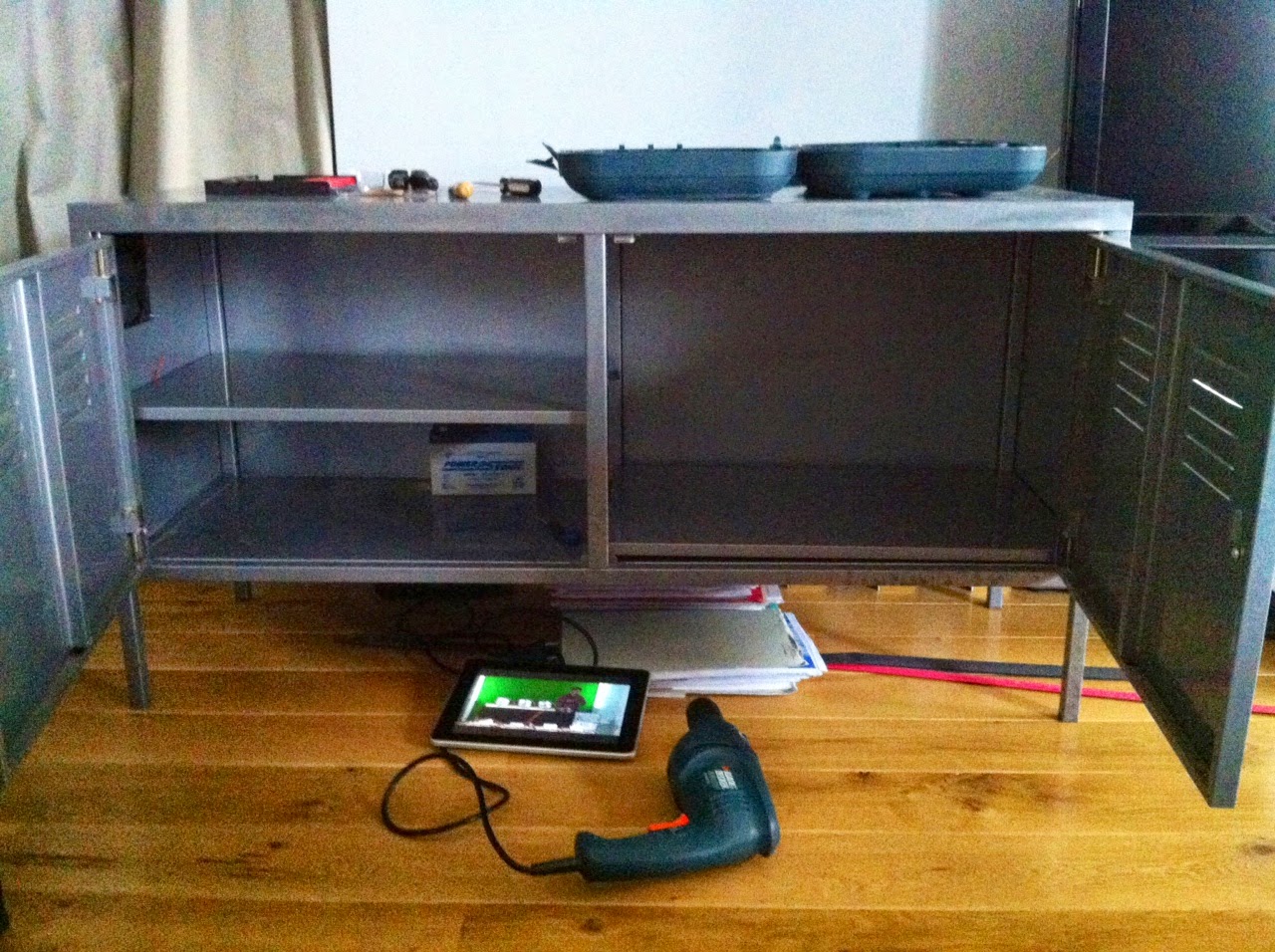
DIY ESS - 24V fan mounted in the metal cabinet & components destinations

Update on the IKEA metal cabinet :


I drilled 4 holes to mount the 24V fan in the upper front left corner of the metal cabinet last night ...


 ... since the grid tie inverters should be positionned on the left upper shelf

Underneath, I will place the Control Board / EMS 

On the right, there is room for the 8 cells battery pack, and even for double, 16 cells, to upgrade to 10kWh, maybe later, if necessary ... 

Also, the right shelf is not used since the cells are 30cm high, but I found that putting it on top of the right bottom (rather thin) piece of metal will make the whole thing stronger to hold the 6*8 = 48kg of the battery pack

Friday, January 25, 2013

Wattson Energy Monitor is getting a lot better !

Wattson is already a great energy monitor because it shows real time power usage & generation, and this is what people need to see to understand what is going on in their home


Day or Night, you know your usage & generation


But if you wanted to see your energy history, then you had to plug Wattson into your computer, upload the data and launch the Holmes graph software to see your usage & generation figures over the last days, months or years ... Good but a bit tedious and time consuming


Energeno will probably launch soon Wattson Anywhere, a portal where you can see all this online; Their director Mark Elliott mentionned this in his last article and Energeno has a link to one of their team member's Wattson Anywhere Public graph on their Optimmersion product page; Check out the very interesting PDF documentation of this Wattson Family Product here: Optimmersion PDF Documentation


I think that now I can say that I have been beta testing this Wattson Wifi & Wattson Anywhere plateform for the last three months and I love it; You can find my home usage and - BESPSS - micro generation graphs on my public Wattson Anywhere page

This portal is great because it works on an iPhone, iPad, Mac, PC and more ... You do not need to install any app on your device, just a web browser is needed


iPad screenshot


iPhone screenshot


You can click to zoom in and see the details of the selected period


Via a user / password link I can access the History, Analysis on the Energy Generated, Account / Set up; Here are some more screenshots (Chrome on OS X) of the History tab:

History - Power


History - Energy

Please Share this Post if you Liked it !

Please Share this Post if you Liked it ! Thanks !
Related Posts Plugin for WordPress, Blogger...