Showing posts with label BESPSS. Show all posts
Tuesday, February 5, 2013
Monday, February 4, 2013
Copper Lugs found in Boat Store in Boulogne - New Lugs & More Crimping
Sometimes, you do not need to go very far to find what you need; This saturday moring, I went to a first boat equipment store in Boulogne, found some nice BlueSea bus bars (made of copper) but no lugs ...
In the afternoon, I tried another boat equipment store, next to La Seine, with boats for sale, and it was a huge store ! I eventually found what I was looking for: some copper lugs for 25mm² and 35mm² cables, and also 25mm², 35mm² and 50mm² copper cables by the meter
For a start, I got two packs of 4 lugs, 25mm² with 8mm hole and 35mm² with 8mm hole too for 1 EUR and 1.5 each, which is not bad ... I can always come back anytime ...
So on sunday, I got rid of these huge aluminum cables and replaced them by shorter twin 16mm² cables, crimped togeter in one lug
Negative cable screwed onto the Battery Bank terminal
and onto the Grid Tie Inverter negative terminal
Same for positive cable
screwed on the Tyco Kilovac contactor
and on the Grid Tie Inverters
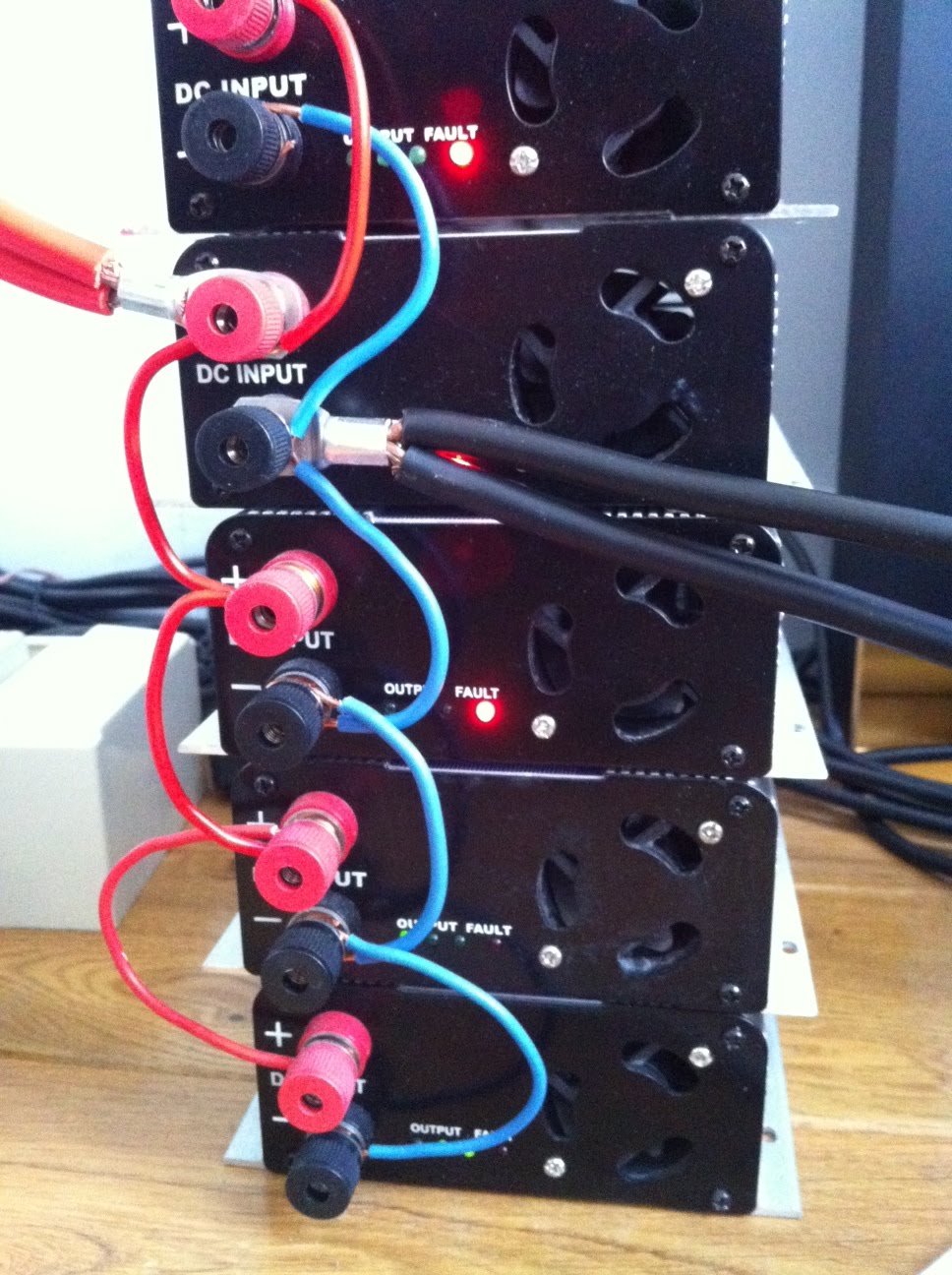
Grid Tie Inverters stack (the ESS is ON)
Et voilà !
Libellés :
BESPSS,
BESS,
boat,
boating,
bus bar,
busbar,
copper,
crimp,
crimping,
demand energy,
demande response,
DIY ESS,
DR,
energy monitor,
energy storage,
equipment,
ESS,
lug,
peak shaving
Friday, February 1, 2013
Low Net Power used while ESS is ON
Libellés :
battery,
BESPSS,
DIY ESS,
energeno,
energy,
energy storage,
ESS,
net poser,
power,
power supply,
usage,
wattson
Wednesday, January 30, 2013
A day with the ESS & Wattson Anywhere
This morning I decided to show a typical day using my Energy Storage System, ESS, along with the - beta version - of Wattson Anywhere
So it starts just after I get up and start my BESPSS by switching it to Inverter Mode; The batteries have been charging all night long, during off peak hours, they are now fully charged.
After this, shower, breakfast, and during these I can see Wattson (I have one downstairs in my bedroom and another one upstairs in the dining room) and also see the usage & generation graph on my iPad using the Wattson Anywhere portal - still in beta version -
So it starts just after I get up and start my BESPSS by switching it to Inverter Mode; The batteries have been charging all night long, during off peak hours, they are now fully charged.
After this, shower, breakfast, and during these I can see Wattson (I have one downstairs in my bedroom and another one upstairs in the dining room) and also see the usage & generation graph on my iPad using the Wattson Anywhere portal - still in beta version -
Wait until the end of the video to see me refresh the Power graph on the iPad and zoom in during the generation period
These temporary used Lead AGM Batteries do not hold much energy, but they are still usefull to continue testing my BESPSS while waiting to get some CALB CA180FI ...
After brushing my teeth, I switch the ESS back into Charge Mode for the day
After my Vectrix ride to work, I light up a cirgarette and take my iPhone out of my pocket to check mails; This is what the Wattson Anywhere portal shows
In case you are wondering, the big 2kW+ usage at night until a bit more than 2AM is the water heater, starting automatically at 10:30PM when the rate is lower - night rate is half the price of day rate here -
After a coffee and saying hi to my colleagues, I start working, and soon I check the graph again, on my office Vista plastic HP PC - :-( - with a Chrome browser
After an hour or so
Let's zoom in a little bit on the last two hours

Karotz, facing Wattson, sends me an email with a picture taken few seconds before; I can then see instant Power Usage - before Wattson Profesional and now Wattson Anywhere, this was the only way I could see my home usage -

Now, I am soon taking a lunch break, I check the portal again and zoom in again to see the overall morning graph
After our lunch and a little coffe, here is the situation

Let's see the Energy used & generated so far: Note the Green Generated Energy this morning, which brought down almost by half the Energy Purchased from EDF, my utility company

Karotz just sent me another photo: I see some light at home ...

and the power usage has gone up, which means the heat pump is working harder to get to the desired temperature (we always lower to 16°C when out and put it back to 19°C when at home)

Back home, I switch the LiFePO4 ESS to Inverter Mode
The effect on Wattson Anywhere graph

10 minutes later
At the end of the day, this is what it looks like on the online portal

and this is the Energy grpah for the whole day

That's it for today !
Karotz, facing Wattson, sends me an email with a picture taken few seconds before; I can then see instant Power Usage - before Wattson Profesional and now Wattson Anywhere, this was the only way I could see my home usage -
Let's refresh my PC Wattson Anywhere graph
Now, I am soon taking a lunch break, I check the portal again and zoom in again to see the overall morning graph
After our lunch and a little coffe, here is the situation
Let's see the Energy used & generated so far: Note the Green Generated Energy this morning, which brought down almost by half the Energy Purchased from EDF, my utility company
Karotz just sent me another photo: I see some light at home ...
and the power usage has gone up, which means the heat pump is working harder to get to the desired temperature (we always lower to 16°C when out and put it back to 19°C when at home)
Back home, I switch the LiFePO4 ESS to Inverter Mode
The effect on Wattson Anywhere graph
10 minutes later
Zooming in the 2nd generation period of the day
At the end of the day, this is what it looks like on the online portal
and this is the Energy grpah for the whole day
That's it for today !
Libellés :
arduino,
BESPSS,
beta,
beta testing,
browser,
DIY ESS,
energy storage,
energy storage system,
ESS,
generation,
graph,
internet,
ipad,
iphone,
micro generation,
online,
peak shaving,
portal,
wattson,
wattson anywhere
Tuesday, January 29, 2013
ESS + Wattson Anywhere = Real Time Follow up of Generated Power at Home
Now with Wattson Anywhere I can keep track of my ESS Generation Anytime & Anywhere on Any device ! For me, this is really cool ...
My LiFePO4 BESPSS = Battery Energy Storage & Power Supply System stores 4kWh of energy and pushes it back into my home grid adjusting its output automatically, thanks to Wattson color codes, to keep the usage (purchased from my utility company EDF) as low as possible
Later on, this will be much improved when my solar panels are connected to my home grid: I will then store free solar energy during the day, and feed it back to my home appliances as soon as the sun is down or when the overall home power usage is high
To seethis Real Time Graph, go to my Public Wattson Anywhere Page
Back in october, when I still had these Mottcells cells (see picture above) on my BESPSS, the generation was pretty close to the usage (see graph below)
Zoom on the two generation periods of this day: Notice how the generation follows closely the usage
The same day, but the Energy graph, showing the amount of "green" energy generated
These are two iPad screenshots taken yesterday, while having breakfast, with my (Lead AGM) BESPSS switched ON
Libellés :
AGM,
battery,
battery bank,
BESPSS,
BESS,
energy storage,
energy storage system,
ESS,
generation,
graph,
Lead,
LiFePO4,
micro generation,
peak shaving,
power supply,
power supply system,
usage,
wattson anywhere
Monday, January 14, 2013
ESS - Crimping Sunday with New 50mm2 Cables & Lugs
Last friday, I went to the supermarket (Leclerc) next to my office after lunch and found cheap gasoline car startup battery cables; I got this set of 2 3.5m 50mm2 cables for 17.50 EUR only :-)
I also found a professional store nearby where I could buy all sizes (almost) of copper lugs

I also found a professional store nearby where I could buy all sizes (almost) of copper lugs
After that I decided to try my Christmas gift, the hydraulic crimping tool, on a doubled 16mm2 cable with a 25mm2 lug
It was very easy to use, a kid could use it, because it does not require a lot of strength ! very smooth ...
It is a bit crooked but the next ones will be fine, I just need to carefully allign the two crimping blocks
Double cable screwed in place between the battery bank positive terminal and the Tyco Kilovac contactor
Then, I worked on the new cables and tryed to use the existing terminals by cutting their perpendicular sides ... Surprise ! Once broken, I realized the metal was not solid copper, but copper platted aluminum ! Now that's why it was cheaper ( BTW, Aluminum's conductivity = 60% of Copper conductivity )
In the end the remaining part was to hard to remove and the result was not flat at all, so I decided to cut the cable and crimp a new lug; Same thing here, the cable is made of copper platted aluminum ...
But the cable would not fit in 25mm2 lug ! The cable says 25mm2 on the insulation though...
Same problem with 35mm2 lug... I think it is 50mm2 and now I get it: they write 25mm2 because it is equivalent to 25mm2 of copper ... but to achieve this conductivity they need twice the section => 50mm2
I then had to cut the residual wires on the surroundings and installed it onto the grid tie inverters stack
After cutting, crimping and installing the negative battery to grid tie inverter stack cable (also 3.5m)
and then testing with full 1200W, more or less 50A-60A ... Well the doubled cable got lukewarm, and the two 3.5m new cables got lukewarm too, but less; I will have to cut them shorter I guess, and use 50mm2 lugs on both ends, but anyways it is much better than before where the simple 16mm2 copper cables were getting pretty warm to really hot !
Libellés :
aluminum,
battery,
BESPSS,
BESS,
cable,
conductivity,
copper,
crimp,
crimping,
ESS,
grid tie inverter,
Kilovac,
LiFePO,
lithium iron phosphate,
lug,
resistance,
test,
testing,
Tool,
Tyco
Subscribe to:
Posts (Atom)
Please Share this Post if you Liked it !
Please Share this Post if you Liked it ! Thanks !